
MCP, skills, hooks & permissions
Spot missing commands, invalid metadata, duplicate definitions and permission rules that mask one another.


The local configuration inspector for coding agents
Trace every instruction. Find the missing rule.
See why your agents see things differently.
Open source. Local. Yours.
 Codex
 Claude Code
 GitHub Copilot
 Gemini CLIExperimental
 CursorExperimental
 OpenCodeExperimental
AGENTS.override.mdTruncatedA real scan of the bundled example. Switch clients to see what changes.
Configuration has become its own codebase. A file here. An override there. Different names, different scopes, different loading rules.
Sightline reads the chain for you. Pick the file you’re working on and see exactly where an instruction lands.
Take the two-minute tour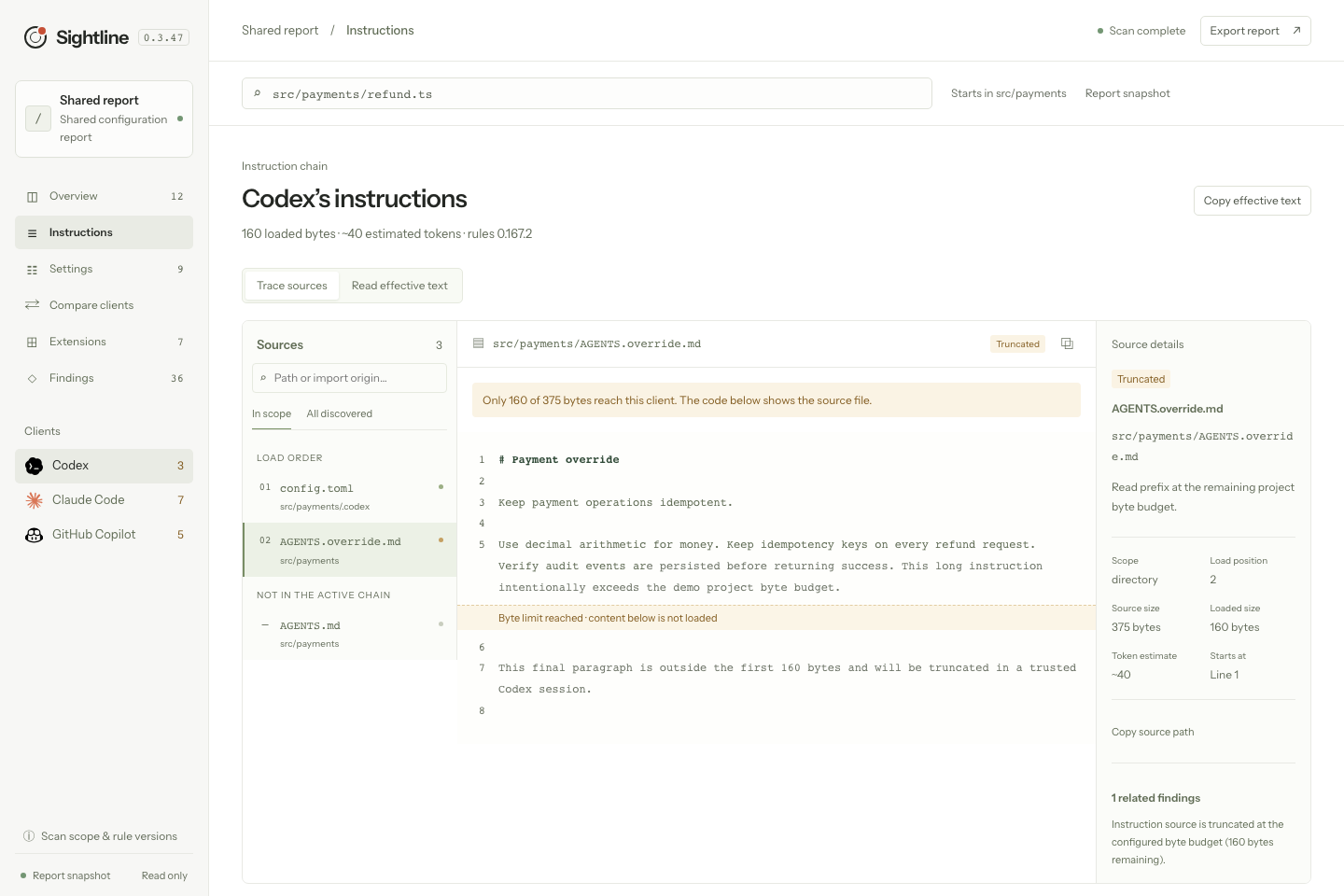
Spot missing commands, invalid metadata, duplicate definitions and permission rules that mask one another.

See the file, line, scope and loading rule behind what’s active, conditional, overridden or truncated.

Export a self-contained, redacted HTML report. Your teammate can explore it without installing anything.

Run it in a terminal, open the local inspector, or set a finding threshold in CI. Stable JSON comes included.
The scan runs locally. Your files stay put. No account, API key, telemetry or model calls are needed to inspect your configuration.
Environment and header values are redacted before they reach a report.
Each adapter records the official rule sources, verified date and known limits. Experimental support is clearly marked.
Codex CLI0.167.2 · binary, source & schemaRuntime + fixturesClaude Code2.1.322 · binary & official docsNative checks + fixturesGitHub Copilot CLI1.0.110 · binary & official docsNative settings + fixturesGemini CLI0.68.0 context imports & local settingsExperimentalCursorProject rules & local MCPExperimentalOpenCode V2Local config & AGENTS.mdExperimentalCodex configuration values and source files have native API comparisons. Twenty-one scripted requests also verify AGENTS.md bodies, byte limits and selected profile budgets/fallback filenames. Other profile fields use versioned fixtures. Session flags, plugins and remote policies have additional limits. Read the coverage notes ↗
One command opens your repository in the local inspector. Follow a finding to its source, compare clients, and see which instructions reach your agent.
Run this from your project folder. The inspector opens in your browser.
npx --yes https://github.com/iamzwxyy/agent-sightline/releases/download/v0.3.47/agent-sightline-0.3.47.tgz ui Installation guide
Node.js 22 or later on macOS, Windows or Linux.

Scans and the inspector are read-only. You receive source locations and suggestions, then choose how to edit your configuration in your own editor.
Sightline models a fresh session launched in the target file’s directory. It resolves the local configuration it can inspect. Runtime toggles, extra command-line flags and remote policies can change a particular session.
You can inspect configuration without installing its client. The inspector marks missing executables and checks extension commands against your local PATH.
Some sources depend on workspace trust, MCP approval or a runtime decision. Sightline keeps those visible and shows what condition must be met. The trust selector lets you model a trusted or untrusted workspace.
Yes. Run agent-sightline ci --no-user --fail-on warn for repository-only diagnostics with a stable JSON report and an exit code determined by the finding threshold.
The default scan checks local definitions and executable discovery. An explicit doctor --probe starts local stdio MCP servers for initialization and tools listing. Hook commands and MCP tools are never invoked by the scan.